Skip to Content

Assetura - Specialized Asset & Maintenance Management System

Complete Digital Control for Assets, Maintenance & Helpdesk
Assetura is a powerful and flexible Asset Management and Maintenance ERP module built on OpenPython (Odoo Framework), designed to give organizations full control over their physical assets, maintenance operations, service contracts, and support tickets. Assetura transforms traditional asset tracking and maintenance processes into a centralized, automated, and fully traceable digital system, ensuring higher asset uptime, better planning, controlled inventory usage, and faster issue resolution. It is ideal for corporate facilities, industrial sites, property owners, service providers, FM companies, and multi-company environments managing large volumes of assets and maintenance teams.
Key Benefits

Managing assets without structure leads to downtime, poor planning, and uncontrolled costs. ​

Complete asset lifecycle management


Preventive & corrective maintenance automation


RFID / Barcode-based asset tagging


Assetura solves this by connecting assets, contracts, maintenance, inventory,  into one unified workflow. 

Contract-driven maintenance planning


Integrated helpdesk and maintenance conversion


Real-time dashboards and analytics

How Assetura Works – End-to-End Asset & Maintenance Workflow

1

System Configuration


2

Process Automation


3

Maintenance Execution


4

Complaint Handling


4

Resolution & Closure


4

Traceability & Reporting


 Walkthrough

Learn how to quickly set up and start using our product with our step-by-step onboarding process.

Initial Configuration & Setup​


Before assets are added, Assetura ensures a clean and scalable foundation.

Configuration Includes

  • Locations (with Google Maps integration)

  • Departments

  • Maintenance teams

  • Predefined asset models (templates)

  • Inventory items (spare parts)

This setup ensures standardized data and consistent operations across the organization.


Asset Models – Standardized Asset Templates​

Assetura introduces Asset Models, which act as predefined templates for similar types of assets.

For example:

  • Electrical Assets

  • Mechanical Assets

  • HVAC Assets

  • IT Equipment

Asset Model Capabilities

  • Define default asset category

  • Predefine technical information

  • Standard maintenance requirements

  • Reusable across multiple assets

When an asset is tagged using a model, all predefined data is automatically applied—saving time and ensuring consistency.


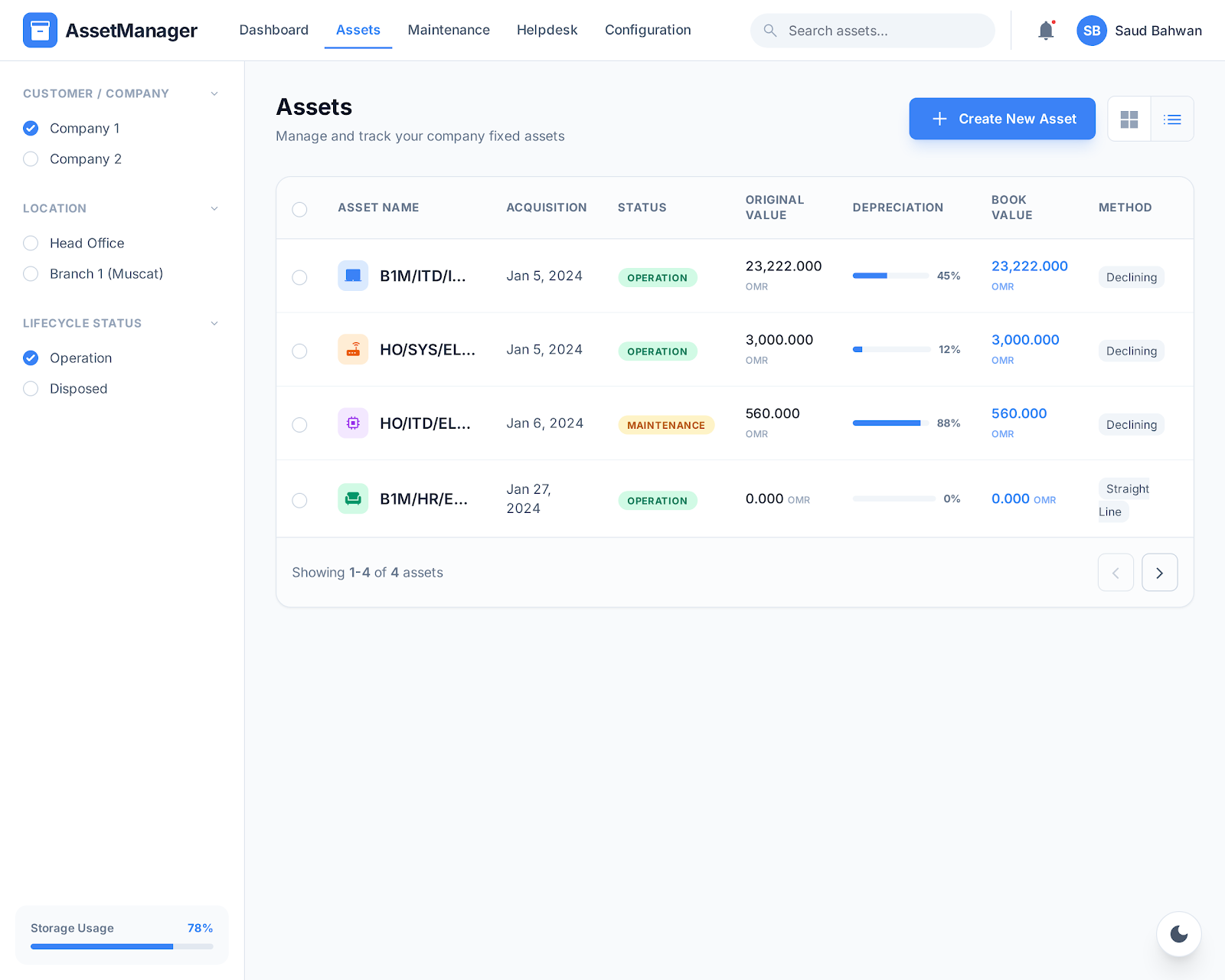
Asset Tagging & Registration

Assets are registered using Barcode or RFID scanners, making tagging fast and accurate.

Asset Tagging Features

  • Scan existing RFID / barcode tags

  • Edit asset details or continue bulk tagging

  • Add multiple assets in one session

  • Confirm and validate asset records

  • Assign assets to:

    • Location

    • Department

    • Responsible person

    • Company

Once confirmed, assets become fully active within the system.

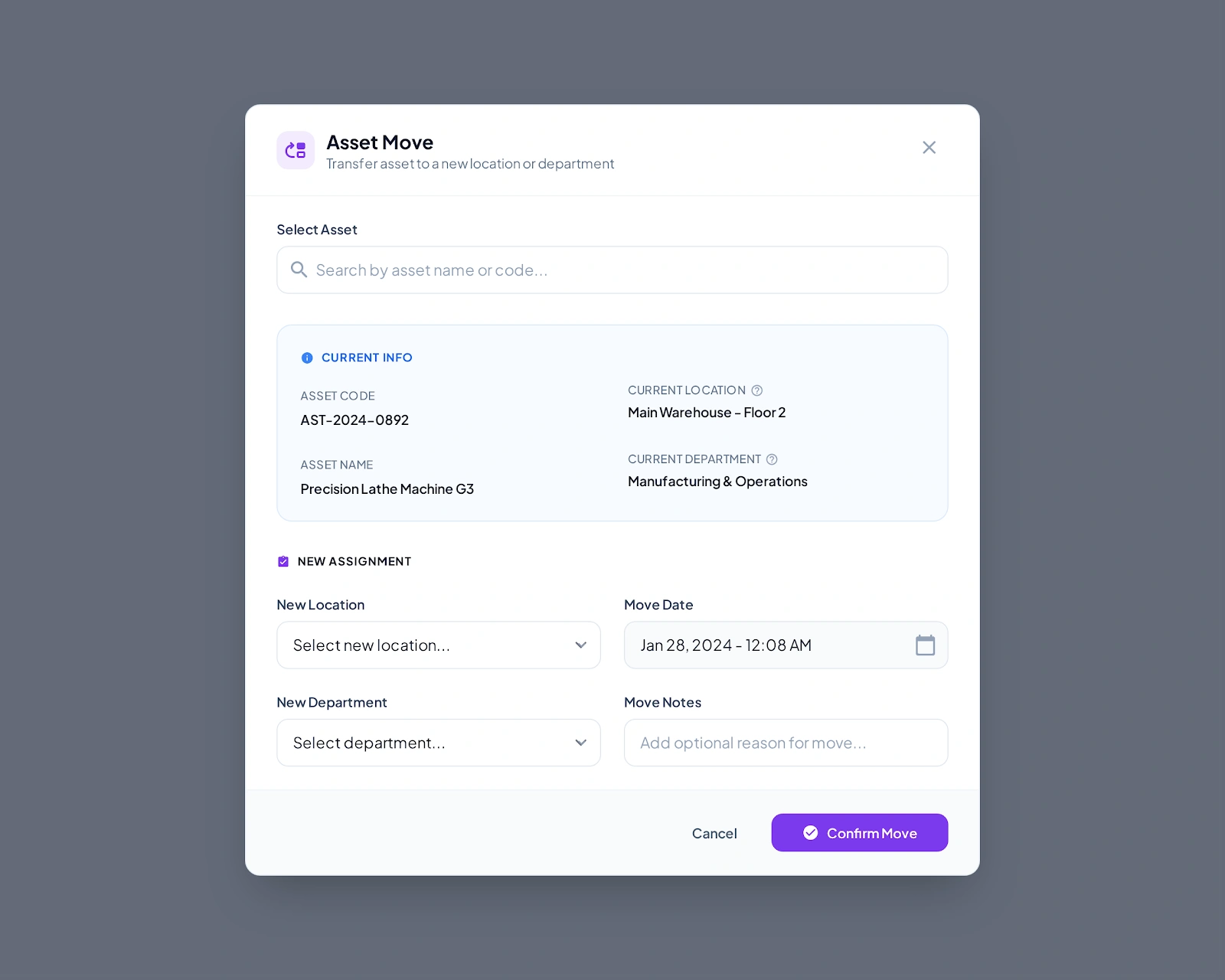
Asset Management & Operations

Assetura allows full control over asset movements and responsibility changes.

Asset Operations

  • Asset movement between locations

  • Asset responsible change

  • Asset status tracking

  • Full asset history and audit trail

Every change is recorded, ensuring accountability and traceability.

Maintenance Contracts Management

Assetura supports flexible and detailed maintenance contracts linked directly to assets.

Contract Types

  • All-inclusive contracts

  • Preventive Maintenance (PM) only

  • Corrective Maintenance only

  • Parts included or excluded contracts

Contract Capabilities

  • Assign contracts per asset

  • Define minimum spare parts quantity (overall)

  • Define spare parts required per maintenance task

  • Set preventive maintenance frequency:

    • Every 30 days

    • Every 60 days

    • Every 90 days

    • Or any custom interval

  • Contract duration management

Contracts drive the entire maintenance automation process.

Preventive Maintenance Automation

Assetura includes a smart scheduler that runs daily to monitor upcoming maintenance.

Preventive Maintenance Flow

  • Scheduler checks contracts daily

  • Maintenance tasks appear 5 days before due date

  • Tasks are auto-created based on contract frequency

  • Assign maintenance teams to tasks

  • Consume required spare parts from inventory

  • Record task execution details

Once a maintenance task is completed:

  • The next PM date is automatically calculated

  • Maintenance history is updated

  • Asset status is refreshed

This ensures zero missed maintenance and maximum asset uptime.

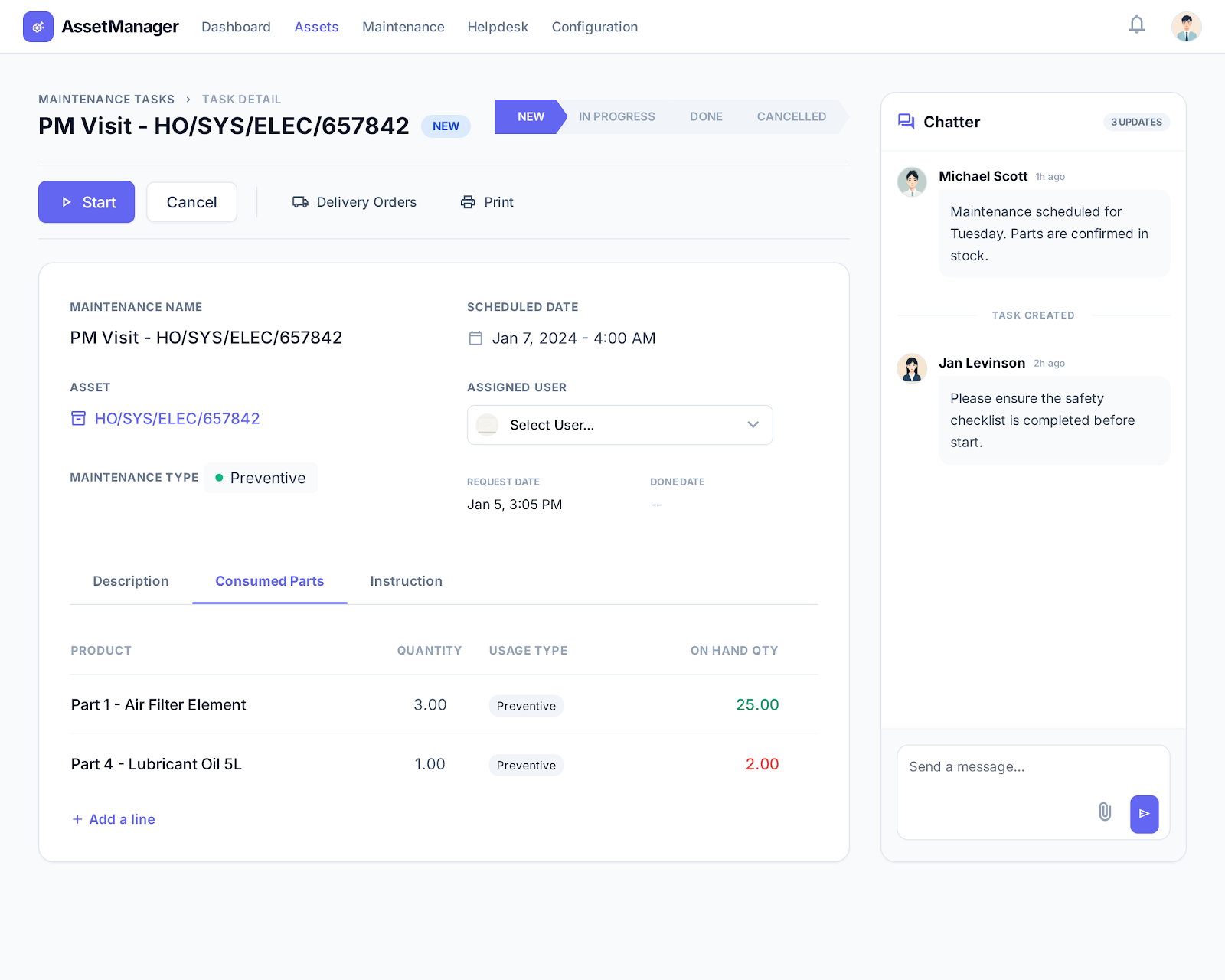
Maintenance Tasks Execution

Each maintenance task is fully structured and traceable.

Maintenance Task Features

  • Preventive or corrective task type

  • Assigned maintenance team

  • Task status tracking

  • Spare parts consumption (linked to inventory)

  • Task notes and completion confirmation

  • Full task history per asset

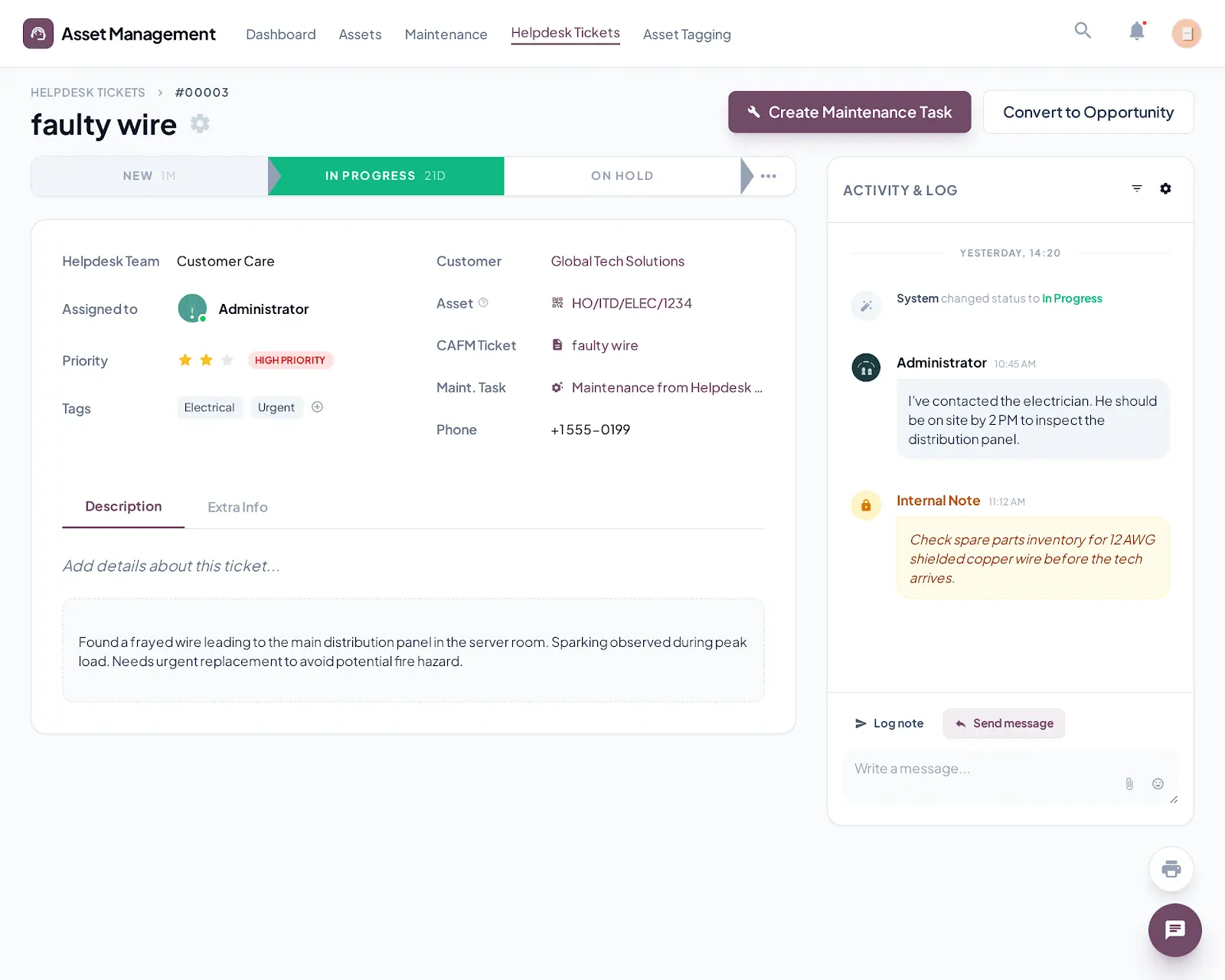
Helpdesk & Complaint Management

Assetura includes an integrated helpdesk system for reactive maintenance.

Helpdesk Features

  • Customer or user submits a complaint

  • Ticket creation with priority levels

  • Assign tickets to responsible personnel

  • Track inspection and response status

Helpdesk to Maintenance Conversion

  • Inspect asset linked to the ticket

  • Convert helpdesk ticket into a maintenance task

  • Automatically generate corrective maintenance

  • Link ticket and maintenance task together

  • Maintain full traceability from complaint to resolution

Maintenance Teams Management

Manage teams efficiently across tasks and locations.

Team Features

  • Define maintenance teams

  • Assign members per team

  • Track team availability (Available / Busy)

  • Assign teams to maintenance tasks

  • Monitor workload and performance

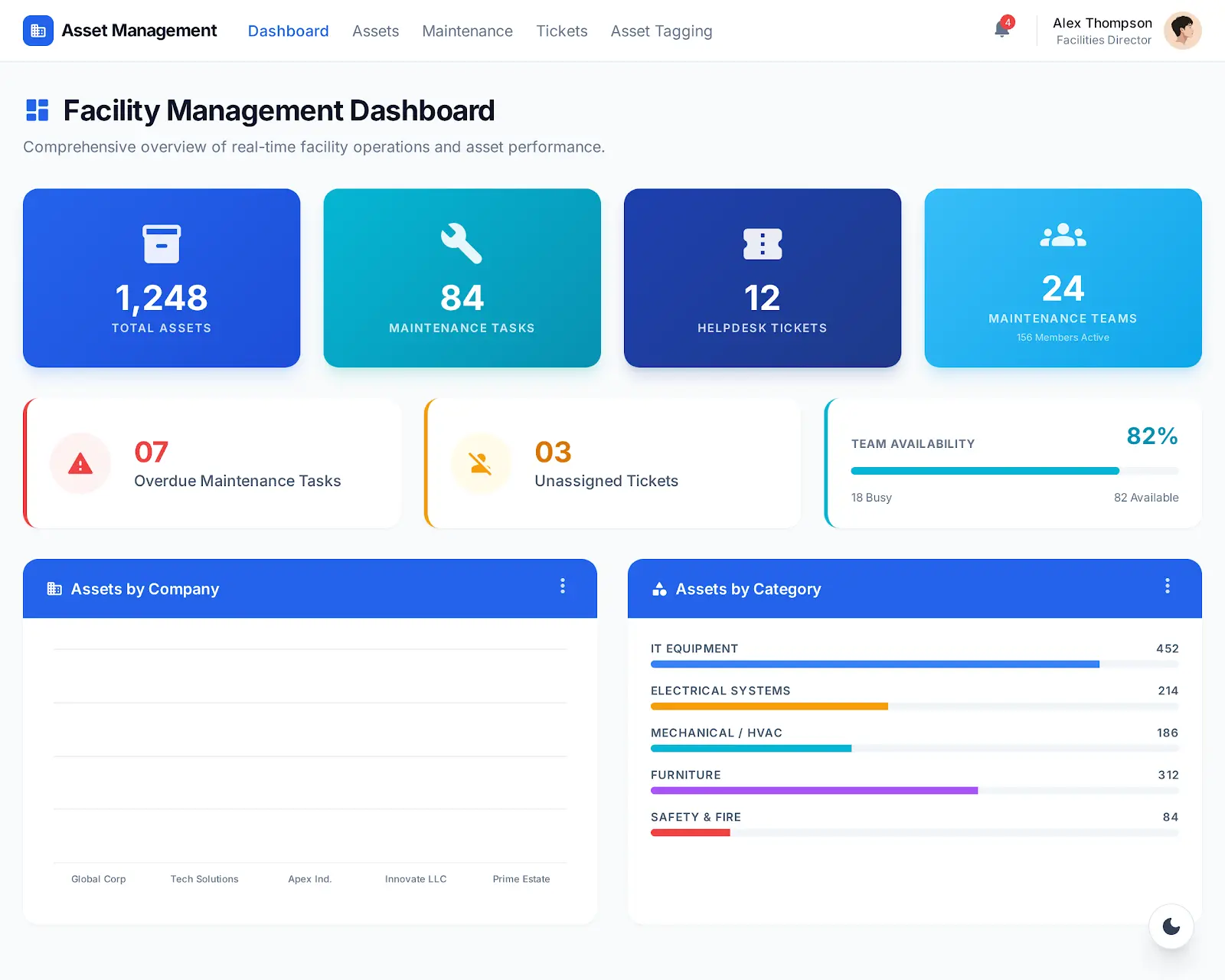
 Dashboard & Analytics

 
Assetura provides a comprehensive real-time dashboard for complete operational visibility.

Dashboard Highlights

Highlight your history, showcase growth and key milestones.

Total assets
Total maintenance tasks
Total helpdesk tickets
Maintenance teams overview​
Assets by category
Assets by company
Available vs busy teams
Maintenance tasks by status
Helpdesk tickets by status